Stream clip from your live feed in seconds
StreamClip cuts the score, the answer, the quote or the turning point straight out of your live SRT stream, fits them to the ratio your channel needs and publishes them to your clip library. Built for sport, talk shows and news.
Broadcasts, clips and directing are available per club or programme after licensing.
The idea
A clip should be finished before the replay ends
Almost every club, show and newsroom already has a camera and a stream. What is missing is the moment right after it: the score, the answer, the headline, finished while the broadcast is still running. Instead that work waits until midnight, in editing software nobody on the staff was trained for. So we put the whole control room on one screen: the feed comes in, you mark in and out, the frame is cropped per channel and the clip is published. One person, one broadcast, no render queue.
Funding is how this grows
StreamClip runs on licence income alone: no ads, no data to sell, no investor deciding what gets built. That keeps the product honest, and it means every next step has to be paid for: more streams at once, faster replays, standby ingests, a human on the line. So funding is open and welcome. Money above the licence income goes into the parts you feel on match day.
Want to fund a highlight or hear the plan first? A call is enough.
Demo film
Watch a moment become a clip
A short film from a live broadcast that mixes it all: a match on the studio screen, a presenter talking it through and the clip cut for your channel.
The live stream lands in your control room, ready to clip.
The full control room with timeline, overlay and export opens after licensing.
How it works
Four steps, one moment
Stream in
Your SRT or HLS stream arrives in the control room. The broadcast is ready with its score, line-up, guests or headlines and logos.
Mark the moment
Play back, hit mark in and mark out, and the clip is locked to the second — or grab the last seconds as a quick replay.
Direct and shape
Switch between live and replay with a cut, dip or wipe, and pick the overlay, ratio and export profile.
Publish
The clip lands in the highlight library right away and goes to your social channels in one click.
Formats
One moment, every channel
Pick the ratio and the app crops the frame — with room for your own logo.

 16:9

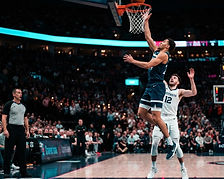 5:4

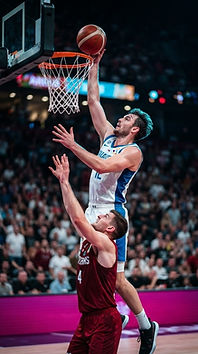 9:16
Features
Everything for your highlights
Live directing
Program and preview bus, T-bar and wipe transitions you can set per broadcast.
Trim to the second
Frame-accurate scrubber and mark points, with custom transport buttons.
Three ratios
16:9, 5:4 and 9:16 from one moment, with AI framing that follows the action.
Overlays and templates
Drag your PNG logo into place and save the setup as a template.
Social publishing
Share link and caption per clip, ready to post.
Insight
See which broadcasts and clips get watched back the most.
Ready to cut?
The environment is available per club or programme. After licensing you sign in and set up your first match, show or bulletin.